
⚡ Quick answer
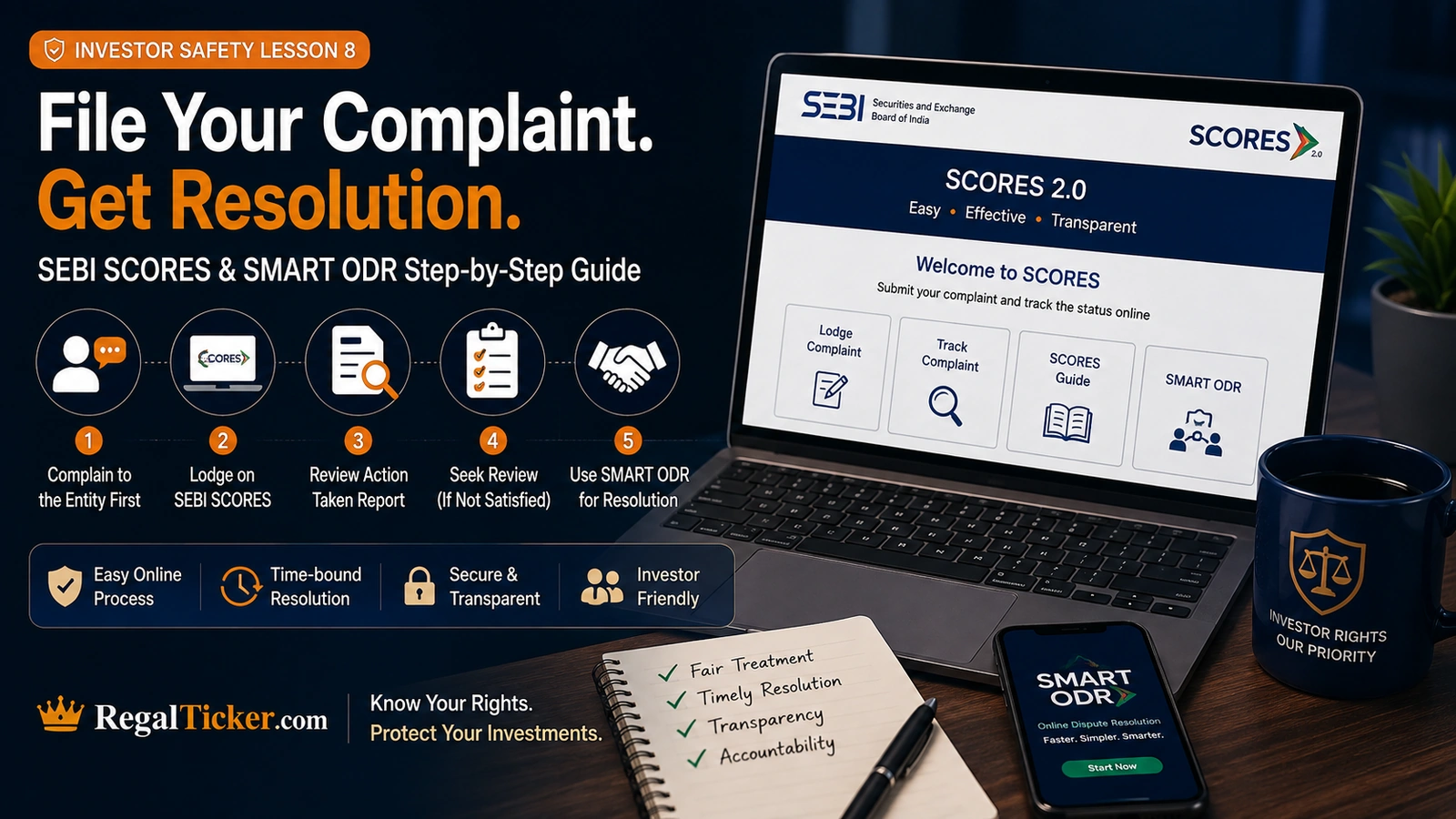
To file a complaint on SEBI SCORES, first complain directly to the listed company, SEBI-registered intermediary or market infrastructure institution and preserve the written response. If the issue remains unresolved, register on the current SCORES portal, select the correct entity and complaint category, describe the grievance clearly and upload supporting documents.
Under the current SCORES 2.0 workflow, the complaint is forwarded to the concerned entity. If you are dissatisfied with its Action Taken Report, you can request a first-level review within the available review window. If still dissatisfied after the designated body’s response, you may seek a second-level review by SEBI. An unresolved dispute may also be taken to SMART ODR for online pre-conciliation, conciliation or arbitration, subject to the applicable process.
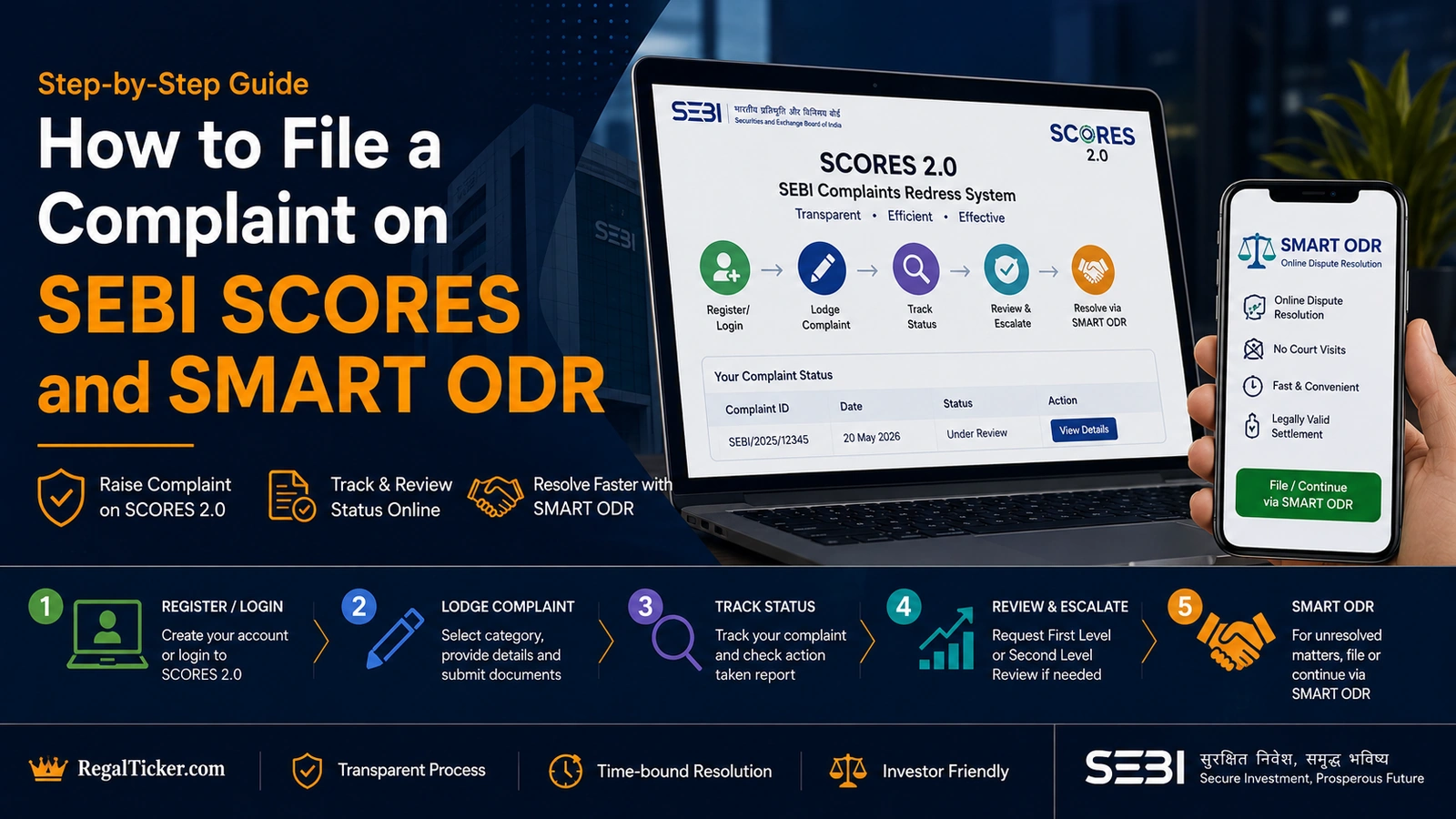
What Are SEBI SCORES and SMART ODR?
SCORES and SMART ODR are related but different investor-protection systems.
SCORES stands for SEBI Complaints Redress System. It is an online platform for lodging and tracking securities-market grievances against listed companies, SEBI-registered intermediaries and market infrastructure institutions.
The current portal explains that investors should first take up the grievance with the concerned entity. SCORES then facilitates redressal, tracks the response and provides a two-level review process.
Use the official SEBI SCORES portal.
SMART ODR stands for Securities Market Approach for Resolution Through Online Dispute Resolution. It uses online pre-conciliation, conciliation and arbitration for disputes involving eligible listed companies, intermediaries and regulated entities.
Use the official SMART ODR portal.
SCORES is primarily a grievance-redressal and review platform. SMART ODR is a dispute-resolution mechanism. Investors should not treat the two names as interchangeable.
This lesson follows How to Secure Your Demat and Trading Account, because alerts, contract notes and account records often become important complaint evidence.
Decide the Correct Route Before Filing
A complaint becomes harder to resolve when it is filed through the wrong system.
Service Grievance
A service grievance may involve:
- delayed account closure;
- incorrect charges;
- missing contract notes;
- unresolved demat credit or debit;
- delayed transfer or transmission;
- non-receipt of corporate-action benefits;
- failure to respond to a written request;
- unauthorised or disputed transactions.
Start with the concerned entity and then use SCORES if the issue remains unresolved.
Dispute Requiring a Determination
A dispute may involve:
- financial compensation;
- liability for an unauthorised trade;
- contested facts;
- contractual interpretation;
- a claim that cannot be resolved through correspondence.
SMART ODR may be relevant after the required prior complaint steps.
Cybercrime or Fake Platform
A fake trading app, impersonation scam or transfer to a fraudulent third-party account may require immediate reporting to the bank, payment provider and cybercrime authorities.
SCORES is designed for grievances against entities within its securities-market scope. It is not a substitute for urgent cybercrime reporting.
Review How to Identify Stock Market Scams and Fake Trading Apps and Telegram Stock Tips when the identity of the platform itself is doubtful.
Market Intelligence
Information about a possible securities-law violation may be market intelligence rather than an individual service complaint.
The SCORES portal states that market-intelligence inputs should be submitted through the appropriate Market Intelligence channel rather than being mixed into an investor-service grievance.
First Complain to the Concerned Entity
SEBI Investor advises investors to approach the listed company or SEBI-registered intermediary first.
Write to the entity’s official grievance or compliance contact and include:
- your name and client details;
- the account, folio or application reference;
- the disputed transaction or service;
- relevant dates;
- the financial or operational impact;
- the action already taken;
- the remedy requested;
- supporting documents.
Use verified contact details from the entity’s official website, exchange record, depository record or SEBI registration information.
Do not rely only on the email address or phone number used by the person who sold the service.
The verification process in How to Verify a SEBI-Registered Intermediary can help confirm the genuine entity before a complaint is filed.
Prepare the Evidence Before You Escalate
A complaint should be specific and supported.
Useful records include:
- account-opening documents;
- agreement or terms of service;
- contract notes;
- demat statements;
- bank statements;
- payment receipts;
- invoices;
- risk-profiling documents;
- research reports;
- screenshots;
- SMS and email alerts;
- call or chat records;
- prior complaints;
- responses from the entity;
- complaint ticket numbers.
Create a simple chronology:
- what happened;
- when it happened;
- when you discovered it;
- when you complained;
- what the entity replied;
- what remains unresolved.
Do not upload unrelated records merely to increase the file size. Each attachment should support a specific part of the complaint.
Register on the SCORES Portal
The current SCORES system can fetch investor details through KYC records or allow completion of the registration form.
The registration process may require:
- PAN or another permitted identifier;
- date of birth;
- mobile number;
- OTP verification;
- email address;
- address details;
- username and password.
Use an email address and mobile number that you control.
Do not allow an adviser, broker representative or account handler to create and control the SCORES login on your behalf.
After registration, keep the username, password and complaint references securely.
How to File a Complaint on SCORES
Step 1: Sign In
Open the official SCORES portal independently and sign in.
Step 2: Select the Correct Complaint Category
Choose the category and nature of complaint carefully.
The category should match the entity and service involved, such as:
- stock broker;
- depository participant;
- investment adviser;
- research analyst;
- mutual fund;
- registrar and transfer agent;
- listed company;
- exchange or depository.
Step 3: Select the Correct Entity
Search for the exact legal or registered entity.
Do not select a similarly named company merely because the brand looks familiar.
Step 4: Describe the Complaint Clearly
Use a direct structure:
- Issue: what went wrong;
- Facts: dates, amounts and transaction references;
- Prior complaint: when and how you approached the entity;
- Response: what the entity said or failed to do;
- Requested remedy: the specific correction, document, reversal or resolution sought.
Step 5: Upload Supporting Documents
Upload the most relevant evidence in the accepted format and size.
Ensure personal information unrelated to the dispute is not exposed unnecessarily.
Step 6: Submit and Save the Registration Number
SCORES generates a complaint reference or registration number.
Save it in more than one secure location.
Write a Complaint That Is Easy to Understand
Avoid emotional or general wording such as:
> The company cheated me and should be punished.
A stronger complaint is:
> On 12 July 2026, 500 shares were sold from trading account ABC123 without my instruction. I received an exchange alert at 11:42 a.m. and complained to the broker by email at 12:15 p.m. The broker acknowledged complaint reference XYZ789 but has not provided the order log or call record. I request investigation of the disputed order, relevant execution records and correction of the resulting financial impact.
A focused complaint identifies:
- the disputed act;
- the evidence;
- prior escalation;
- the unresolved point;
- the requested action.
Do not exaggerate a financial claim. State what can be supported by records.
How the SCORES 2.0 Workflow Operates
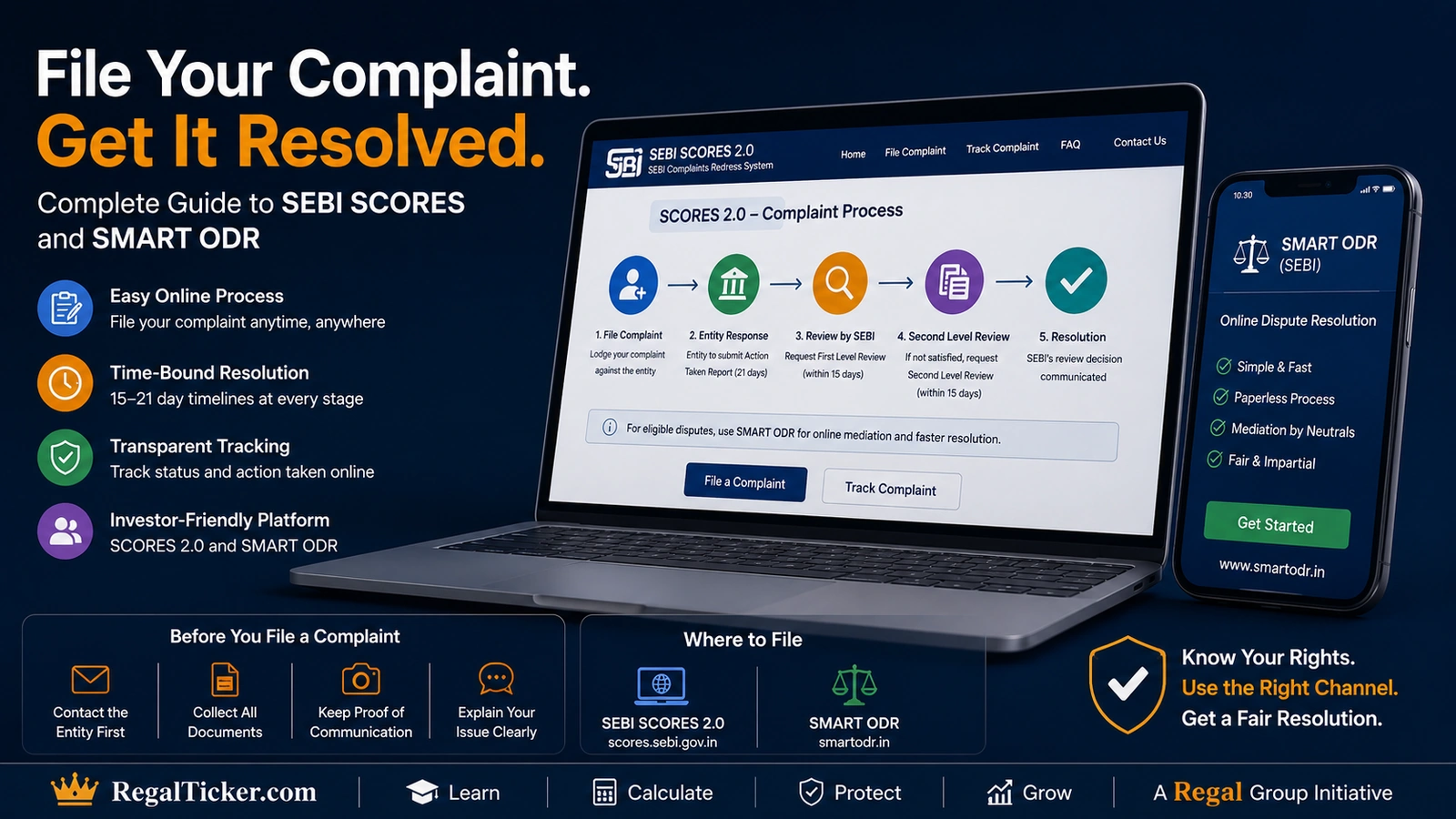
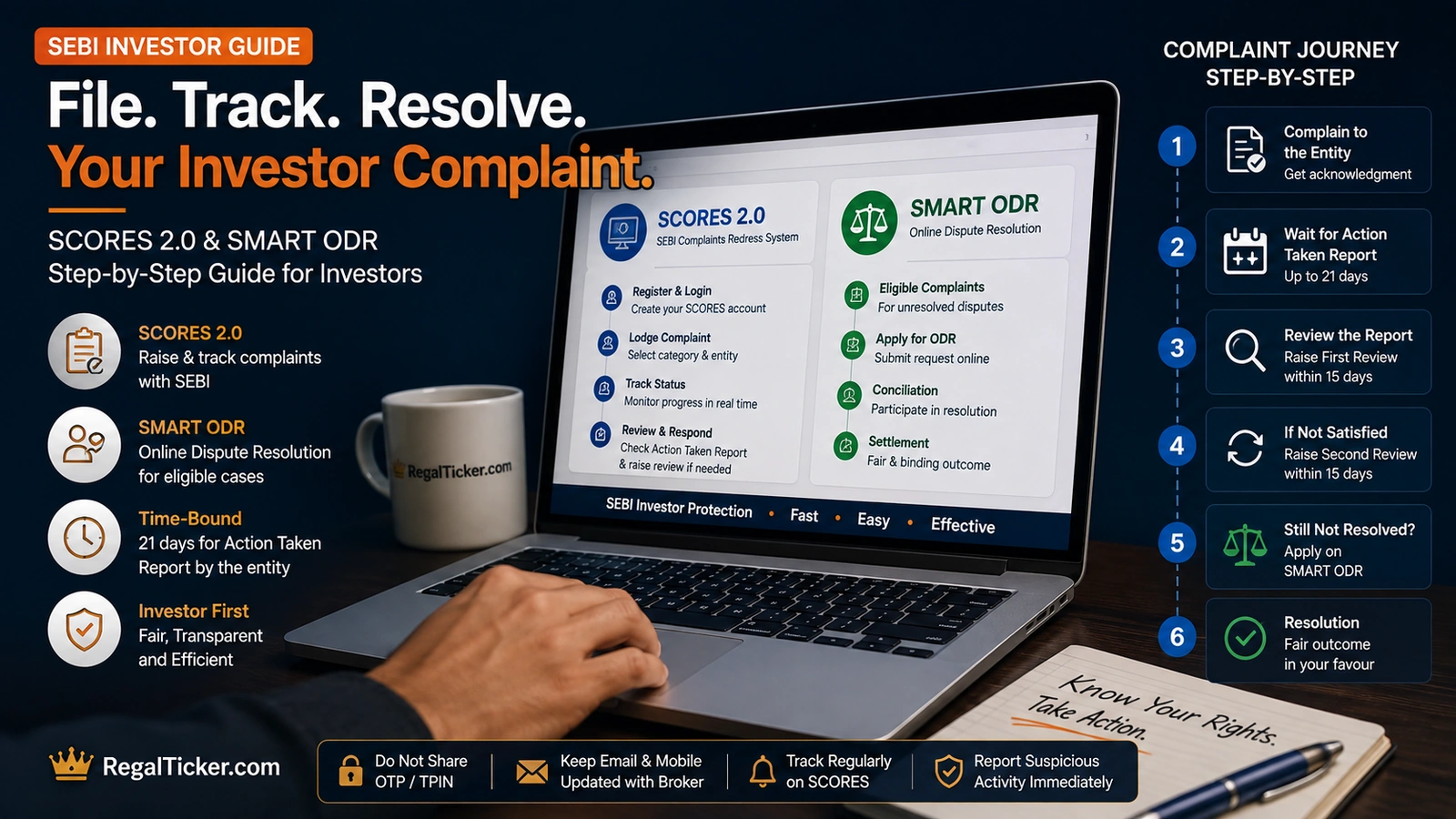
The SCORES portal forwards the complaint to the concerned entity.
The current published workflow describes the following sequence:
- the entity provides an Action Taken Report;
- the investor reviews the response;
- the investor may seek first-level review within 15 days of receiving the entity’s Action Taken Report;
- a designated body reviews the complaint;
- if still dissatisfied, the investor may seek second-level review within 15 days of receiving the designated body’s Action Taken Report;
- SEBI handles the second-level review;
- the investor may provide feedback after closure.
SEBI’s published May 2026 SCORES statistics describe entities as having 21 days to submit the Action Taken Report under SCORES 2.0.
Investors should follow the live portal deadlines shown in their complaint dashboard because applicable timelines and process details may be updated.
Review the Action Taken Report Carefully
An Action Taken Report should be assessed against the actual complaint.
Ask:
- Did the entity answer each disputed point?
- Did it provide the requested records?
- Does the response match the contract note, statement or agreement?
- Has the correction actually appeared in the account?
- Was the financial calculation explained?
- Does the entity rely on a document you never received?
- Is the complaint being closed only because a generic response was sent?
If the response resolves the complaint, confirm the correction and preserve the records.
If it does not, request review within the portal’s available window and explain exactly what remains unanswered.
Do not simply write “not satisfied.” Identify the missing evidence, incorrect statement or unresolved remedy.
Complaints Against Different Market Participants
Stock Broker
Common complaints include:
- unauthorised trades;
- incorrect charges;
- non-transfer of funds or securities;
- margin or pledge disputes;
- missing contract notes;
- account closure delays.
Preserve order details, exchange alerts, contract notes and written communication.
Depository Participant
Common issues include:
- unauthorised demat debit;
- incorrect account details;
- pledge-related problems;
- delayed transfer, transmission or closure;
- missing corporate-action credit.
Preserve transaction statements, alerts and DP correspondence.
Investment Adviser or Research Analyst
Common issues include:
- misleading promises;
- unsuitable recommendations;
- hidden fees;
- unregistered activity;
- failure to provide disclosures;
- account-handling requests.
Read Investment Fraud and Mis-Selling before drafting the complaint.
Listed Company or Registrar
Common issues include:
- dividend or corporate-action entitlement;
- transmission or name-change delay;
- duplicate certificate or dematerialisation request;
- unclaimed securities;
- investor-service failures.
State the folio, demat details, corporate action and prior service requests clearly.
When to Use SMART ODR
SMART ODR may be used for eligible securities-market disputes after the investor has first taken up the matter with the concerned intermediary or regulated entity.
SEBI Investor identifies a broad range of eligible entities, including:
- stock brokers;
- depository participants;
- investment advisers;
- research analysts;
- mutual funds;
- portfolio managers;
- registrars and transfer agents;
- listed companies and other specified market participants.
SMART ODR can provide:
- pre-conciliation;
- online conciliation;
- online arbitration.
The official portal explains that investors can create an account, select the intermediary and dispute category, submit the details and track progress online.
How to File a Dispute on SMART ODR
Step 1: Confirm Prior Escalation
Ensure the complaint was first raised with the concerned entity.
Preserve the complaint and response.
Step 2: Create an Investor Account
Use your own email, mobile number and PAN details where required.
Step 3: Select the Market Participant
Choose the correct listed company, intermediary or regulated entity.
Step 4: Select the Dispute Category
Use the category that best describes the unresolved issue.
Step 5: State the Claim and Upload Evidence
Explain the facts, amount claimed where applicable, prior complaint history and requested relief.
Step 6: Track Pre-Conciliation, Conciliation or Arbitration
Monitor notices, deadlines and document requests through the portal.
The current SEBI Investor guidance describes pre-conciliation as free for both the investor and market participant. Costs at later stages depend on the applicable rules and claim value, so investors should check the live portal and current circular before proceeding.
Calculate and Document Financial Impact
A complaint should distinguish actual loss from expected or hypothetical profit.
For an unauthorised trade, document:
- purchase or sale price;
- quantity;
- brokerage and charges;
- subsequent correction, if any;
- amount actually debited or credited;
- verifiable loss caused by the disputed act.
Use the Stock Return Calculator to convert a disputed price movement into a percentage.
Use the CAGR Calculator when the complaint involves a misleading multi-year return claim.
Use the Risk–Reward Calculator when unsuitable trading advice was sold using a stated entry, stop-loss and target.
These calculators help organise the mathematics. They do not determine legal liability or compensation.
What SCORES May Not Treat as a Complaint
The SCORES information pages identify matters that may fall outside the complaint mechanism, including:
- matters unrelated to securities-market investment;
- anonymous or incomplete complaints;
- vague allegations without supporting details;
- requests for general guidance or explanation;
- market-intelligence inputs;
- matters already pending in an applicable dispute-resolution mechanism;
- complaints outside the permitted limitation period.
SEBI Investor states that complaints should generally be lodged on SCORES within one year from the date of the cause of action.
Do not wait until records, alerts or account statements become unavailable.
Investor Complaint Filing Checklist
Before submitting, confirm:
- I first complained to the concerned entity.
- I verified the exact legal entity.
- I selected the correct complaint category.
- My complaint describes specific dates and events.
- I attached relevant supporting documents.
- I identified what remains unresolved.
- I stated the remedy requested.
- I calculated the financial impact accurately.
- I saved the complaint registration number.
- I will monitor the Action Taken Report.
- I understand the first-level review window.
- I understand the second-level review window.
- I know when SMART ODR may be appropriate.
- I preserved all correspondence and portal records.
- I will report cybercrime separately when required.
The Regal Ticker Investor Tools hub contains calculators that can help document return, loss and risk claims accurately.
Final Takeaway
An effective investor complaint is not merely an expression of dissatisfaction.
It is a structured record containing:
- the correct entity;
- the disputed act or service;
- dates and references;
- supporting evidence;
- prior complaint history;
- the unresolved point;
- the remedy requested.
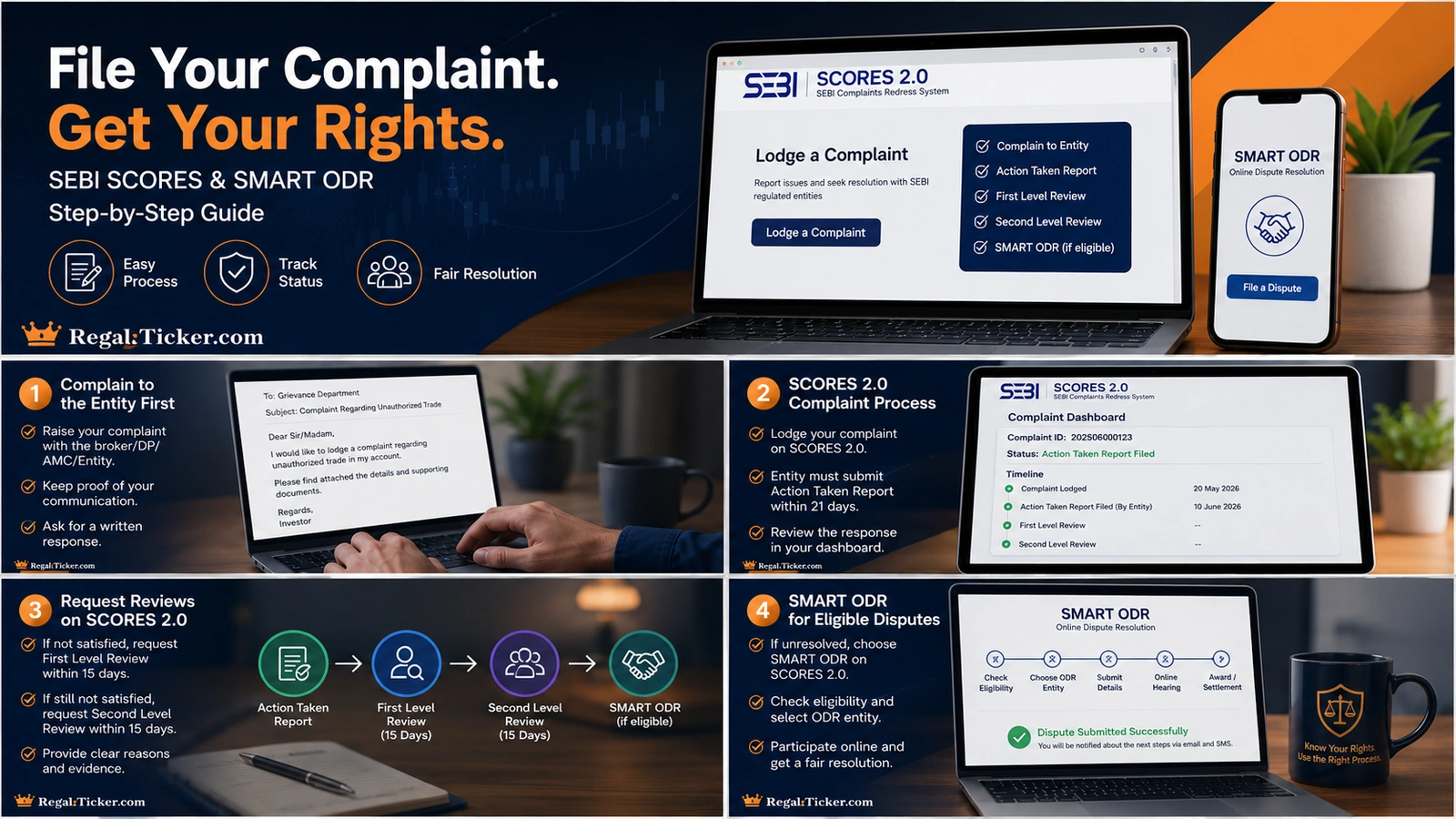
Approach the entity first. Use SCORES when the grievance remains unresolved. Use review windows promptly. Consider SMART ODR when an eligible dispute requires online conciliation or arbitration.
The stronger the evidence and chronology, the easier it is for every stage of the process to understand the issue.
Frequently asked questions
What is SEBI SCORES?
SCORES is SEBI’s online platform for lodging and tracking securities-market grievances against listed companies, registered intermediaries and market infrastructure institutions.
Should I contact the broker or company before using SCORES?
Yes. SEBI Investor and the SCORES portal state that investors should first approach the concerned entity for redressal.
How long does the entity get to respond on SCORES?
SEBI’s published May 2026 SCORES workflow states that entities have 21 days to submit an Action Taken Report under SCORES 2.0. Investors should follow the deadline displayed on the live portal.
What happens if I am not satisfied with the Action Taken Report?
You may request first-level review within the available 15-day window. If dissatisfied with the designated body’s response, you may request second-level review within the next 15-day window.
What is SMART ODR?
SMART ODR is an online dispute-resolution platform for eligible securities-market disputes using pre-conciliation, conciliation and arbitration.
Can I claim compensation through SCORES?
SCORES facilitates grievance redressal and reviews. A contested claim requiring adjudication or dispute resolution may need SMART ODR or another appropriate legal route.
Can I file a fake trading app complaint on SCORES?
A complaint against a genuine SEBI-regulated entity may fall within SCORES. A fake app or impersonation scam may also require immediate bank, payment-provider and cybercrime reporting.
What documents should I attach?
Attach relevant records such as prior complaints, contract notes, statements, alerts, payment records, agreements, screenshots and the entity’s response.
Verify through official sources
Official references
- 1. [SEBI SCORES — Official Portal](https://scores.sebi.gov.in)
- 2. [SEBI Investor — SCORES](https://investor.sebi.gov.in/sebi_scores.html)
- 3. [SEBI Investor — Grievance Redressal in the Securities Market](https://investor.sebi.gov.in/securities-resolvedispute.html)
- 4. [SEBI — Status of SCORES Complaints and SCORES 2.0 Workflow, May 2026](https://www.sebi.gov.in/sebi_data/attachdocs/jun-2026/1782361109000.pdf)
- 5. [SMART ODR — Official Portal](https://smartodr.in)
- 6. [SEBI Investor — SMART ODR](https://investor.sebi.gov.in/smart_orr.html)
- 7. [NSE — File and Track an Investor Complaint](https://www.nseindia.com/static/complaints/file-a-complaint-online)
- 8. [NSE Investor Centre — NICE Plus](https://investorhelpline.nseindia.com/NICEPLUS/)
- 9. [SEBI — Investor Charter for Investment Advisers, June 2025](https://www.sebi.gov.in/sebi_data/attachdocs/jun-2025/1748863758785.pdf)
- 10. [SEBI — Redressal of Investor Grievances Through SCORES and Linking to ODR, September 2023](https://www.sebi.gov.in/legal/circulars/sep-2023/redressal-of-investor-grievances-through-the-sebi-complaint-redressal-scores-platform-and-linking-it-to-online-dispute-resolution-platform_77159.html)
Educational disclaimer: This article is for education and general information only. It does not provide legal, regulatory, investment or dispute-resolution advice. Complaint categories, limitation periods, response timelines, fees and portal procedures may change. Verify the current process on the official SCORES, SMART ODR, SEBI, exchange and depository websites before filing.